On August 18, 2026, the Joomla project quietly shipped two point releases — 6.1.3 and 5.4.8 — addressing a pair of permission-check gaps that most site owners running Joomla will never have noticed on their own, precisely because that’s what makes a permission bug dangerous in the first place. Nothing crashes, nothing looks wrong, the site keeps working exactly as expected. The problem is invisible until someone finds it deliberately.
This is also exactly the kind of release that’s easiest to overlook amid louder WordPress news the same week — WordPress 7.1 and its own headline features dominated most CMS coverage this month, and a quiet two-fix Joomla point release genuinely doesn’t compete for attention against that. But for the sizable share of site owners running Joomla specifically, this is the update that actually matters to them this week, and it deserves the same level of practical guidance any WordPress release gets.
Here’s exactly what changed, why it matters more than a typical minor version bump, and how to get updated without breaking anything in the process.
What Actually Shipped
Two specific fixes are behind this release, and it’s worth understanding both individually rather than treating “security patch” as a vague catch-all:
Web service (API) endpoints now apply the same permission checks as the administrator interface. Joomla’s REST-style web service layer — used by headless setups, mobile apps built on top of Joomla, and any custom integration talking to your site programmatically — had been enforcing permissions less strictly than the standard admin interface for the same underlying actions. In practice, this meant a request routed through the API could potentially succeed in a context where the equivalent action through the normal admin panel would have been correctly blocked.
Strengthened permission checks when creating custom fields and categories. A narrower, more specific fix affecting the workflow for creating new custom fields and categories, tightening the permission validation around who’s actually allowed to create these particular content structures.
Joomla 6.1.3 two security fixes diagram
Neither of these is a headline-grabbing, actively-exploited-in-the-wild emergency in the way a critical remote code execution vulnerability would be. Both are the quieter, more common category of Joomla security work: permission and access-control gaps that get found through careful code review rather than through an attack already happening.
A Closer Look at the API Permission Fix
Joomla’s web services layer is what powers headless setups, custom mobile apps built against a Joomla backend, and any external system that reads from or writes to your site programmatically rather than through the standard browser-based admin interface. Since Joomla 4, this API layer has grown into a genuinely capable alternative way to interact with a Joomla site — which is exactly why a permission-enforcement gap in that specific layer matters more than it might have a few versions ago, when the API surface was smaller and less relied upon.
The core issue this patch addresses is a mismatch: the standard admin interface and the API were not applying identical permission logic for equivalent actions. In well-designed software, “can this user perform this action” should be answered the same way regardless of which door they walked through to ask the question — the browser-based admin panel and the API should both consult the same underlying permission rules. Before this fix, that consistency wasn’t fully guaranteed across every endpoint, which is precisely the kind of subtle architectural gap that’s easy to miss in code review and easy for a determined attacker to eventually find through systematic testing.
For a site with no API usage at all, this specific fix is lower-priority in practice, though there’s no real downside to applying it regardless. For a site with any headless frontend, custom integration, or third-party service reading from your Joomla installation via its API, this is the more directly relevant half of the release, and worth treating with a bit more urgency.
A Closer Look at the Custom Fields and Categories Fix
The second fix is narrower in scope but follows the same underlying pattern: permission validation that wasn’t as strict as it should have been for a specific content-management workflow, in this case creating new custom fields and categories. Custom fields and categories are structural, site-wide elements — they don’t just affect one article, they shape how content gets organized and displayed across the entire site. A permission gap that allows a lower-privileged user to create these structures where they shouldn’t be able to is a smaller-scale version of the same class of problem as the API issue: the system’s stated rules about who can do what weren’t being fully enforced in every relevant code path.
Sites most likely to have felt this gap in practice are ones with multiple content contributors at different permission levels — a newsroom-style setup, a multi-department organizational site, or any Joomla install where “Author” or “Editor” level users work alongside full Administrators. On a single-admin site, this fix matters less in practice, but again, costs nothing to apply.
Why Permission Bugs Deserve Real Attention, Even When They’re Quiet
It’s worth being clear about why this category of fix matters, since “permission check” can sound abstract compared to something more dramatic-sounding. A permission or access-control gap means the system’s rules about who’s allowed to do what aren’t being enforced correctly in every code path — which in practice means a user with lower-level access, or in the API case, a request that shouldn’t have been authorized at all, could potentially perform an action reserved for someone with more trust.
For a typical small business or organizational Joomla site, the realistic risk profile here is lower than a headline-grabbing zero-day, but not zero. If you run:
A multi-author site where different users have different permission levels, this closes a real gap between what those permission levels are supposed to mean and what they actually enforced before the patch.
Any headless or API-driven setup — a custom mobile app, a decoupled frontend, an integration pulling or pushing data through Joomla’s web services — this is the more directly relevant fix, since it specifically addresses the API layer’s permission enforcement.
A straightforward single-admin site with no API integrations and no multi-user permission structure, your practical exposure is lower, but “lower” isn’t “none,” and there’s no real cost to updating regardless.
How Joomla’s Security Disclosure Process Actually Works
It’s worth understanding the mechanics behind a release like this, since it explains both the timing and why details are often disclosed carefully rather than immediately. Joomla maintains a dedicated security strike team that receives vulnerability reports — sometimes from the core team’s own review, sometimes from independent security researchers — and coordinates a fix before any public disclosure of the specific technical details. This is standard responsible-disclosure practice across the software industry: patch first, explain exactly how the vulnerability worked afterward, so the window between “the fix is public” and “the exploit details are public” doesn’t hand attackers a roadmap before site owners have had a reasonable chance to update.
This is also why security release notes are sometimes frustratingly vague in the first day or two after release — “strengthened permission checks” rather than a full technical writeup of exactly what was broken and how. That vagueness is deliberate, not an oversight, and more detailed technical analysis typically follows in the weeks after, once the update has had time to propagate across the ecosystem.
Auditing Your Extensions While You’re In There
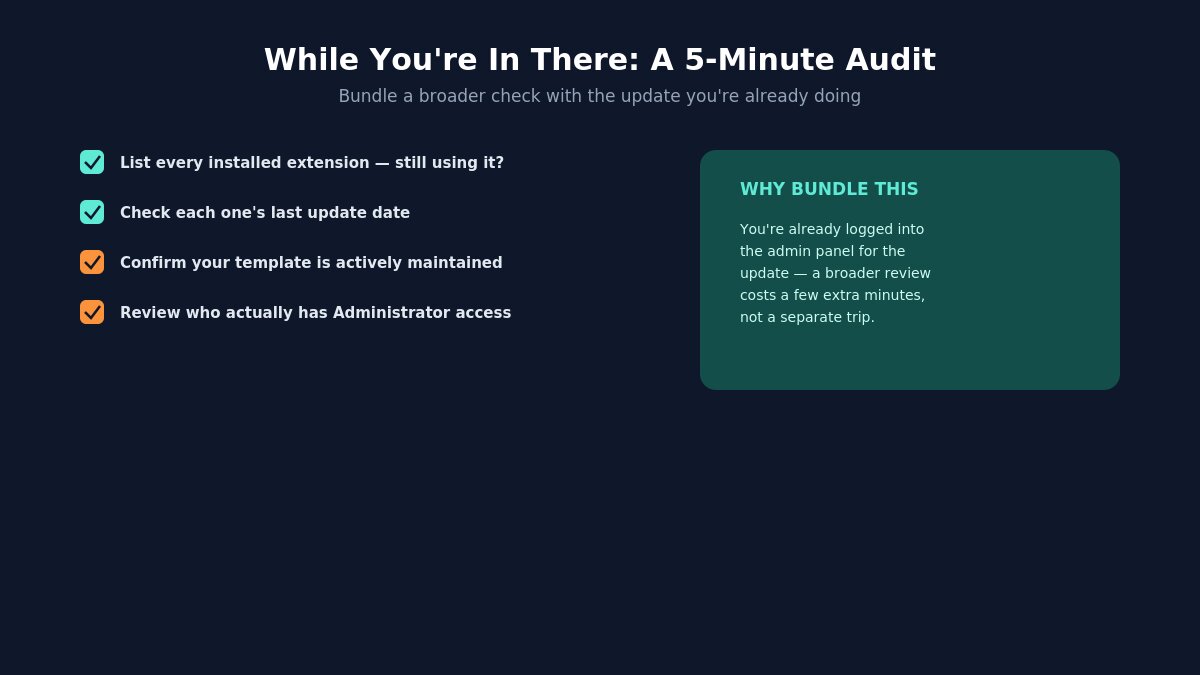
Auditing Joomla extensions during a security update
Since a security update already has you logged into the back end of your site, it’s a reasonable moment to do a broader five-minute audit rather than treating this as a single isolated task:
List every installed extension and ask honestly whether you still use each one — an unused, outdated extension sitting deactivated but still installed is unnecessary attack surface that a routine update won’t touch.
Check each extension’s last update date against how actively it appears to be maintained — an extension that hasn’t shipped an update in over a year, especially one handling forms, user data, or payments, deserves a closer look regardless of whether it’s directly implicated in this specific patch.
Confirm your template itself is current and actively maintained, since templates can carry their own update needs independent of Joomla core — worth checking your changelog or contacting your template’s support channel if you’re unsure when it was last updated.
Review who has Administrator-level access on the site and whether that list still reflects who actually needs it — permission-check bugs matter less when the number of people who could theoretically hit the edge case is kept genuinely minimal in the first place.
None of this is required specifically because of the 6.1.3/5.4.8 patch, but bundling a broader review with a security update you’re already doing is a more efficient use of the time than treating every task as a separate trip into the admin panel.
Are You Actually Affected?
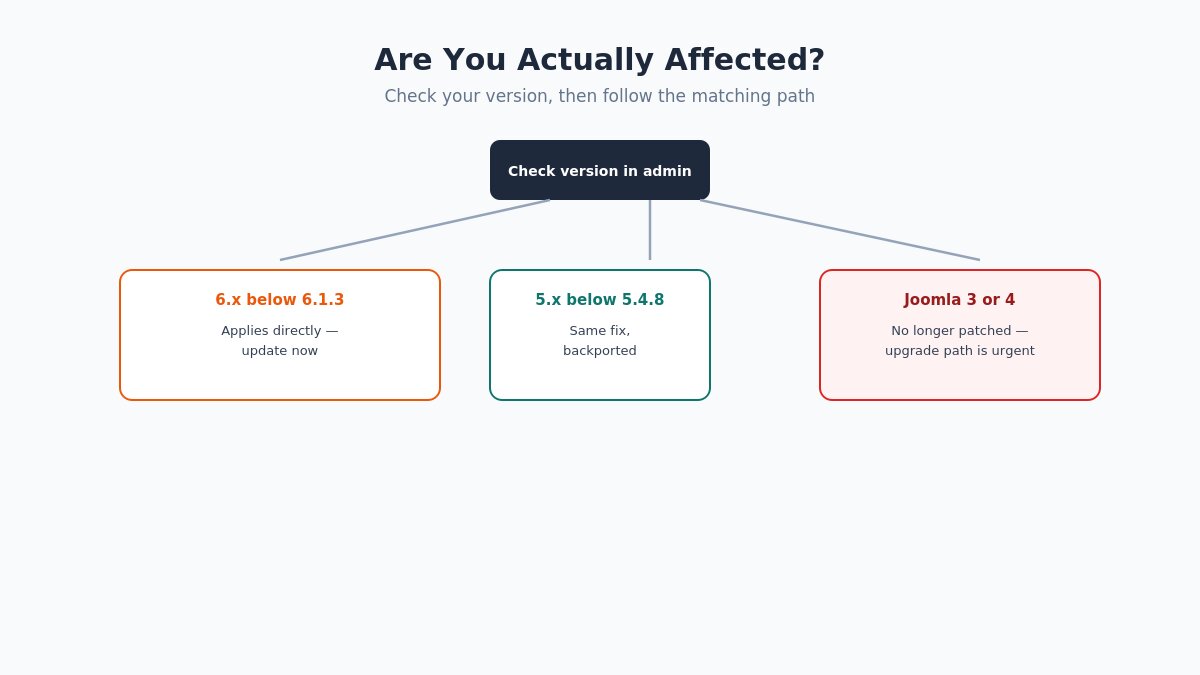
Joomla version check flowchart for security patch
Before doing anything else, confirm which version you’re actually running and whether this patch applies to you:
Log in to your Joomla administrator panel and check the version number, typically visible on the System Information page or in the footer of the admin dashboard.
If you’re on Joomla 6.x below 6.1.3, this patch applies directly — update as described below.
If you’re on Joomla 5.x below 5.4.8, the same applies — Joomla backported this fix to the 5.x line specifically because of how many sites are still running it.
If you’re on Joomla 4.x or earlier, including the still-common Joomla 3.x installs, this specific patch doesn’t apply to your version at all, which is a different and arguably more urgent problem — those versions are past their supported lifecycle and no longer receive security fixes of any kind, this one included. If that’s your situation, upgrading to a currently supported version is the real fix, not just this one patch. Our own guide to updating from Joomla 3 to Joomla 4 is a reasonable starting point if you’re in this position and haven’t made the jump yet.
How to Update Safely
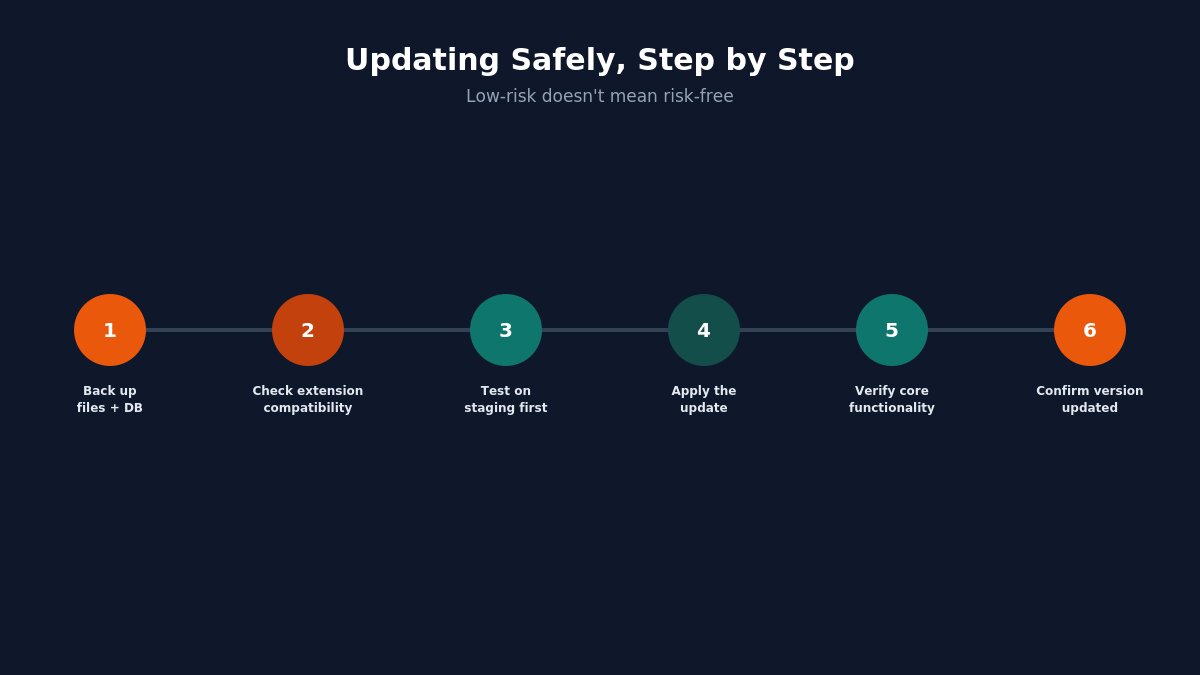
Steps to safely update Joomla to 6.1.3 or 5.4.8
A point release like this is normally low-risk, but “normally low-risk” and “risk-free” aren’t the same thing, and skipping basic precautions is how a routine ten-minute update turns into an afternoon of troubleshooting.
Back up your site first — database and files both, not just one or the other. If you’re not confident in your current backup setup, this is worth resolving before you touch the update button, not after something goes wrong.
Check your installed extensions’ compatibility with the target version, particularly if you’re jumping multiple point releases at once rather than updating incrementally.
Update on a staging copy first if you have one available, especially for a site with any custom development or an unusual extension combination.
Apply the update through Joomla’s built-in updater (System → Update → Joomla) or via your hosting control panel if it offers one-click Joomla updates.
Verify core functionality afterward — log in, check the front end renders correctly, test any API integrations specifically if that’s part of your setup, given that’s exactly what this patch touches.
Confirm your version number updated correctly in System Information rather than assuming the update completed just because no error appeared.
If you’d rather not handle this yourself, or you’re managing a site with enough custom work that you want an extra set of eyes on it before updating, this falls squarely into the kind of task covered under our custom Joomla upgrade service — worth considering particularly for sites with heavy customization where a DIY update carries more risk of something breaking quietly. For newer site owners who’d rather not troubleshoot an update process at all, our Quickstart Installation Service team can also handle the groundwork of getting a site properly configured on a current, supported version from the outset, which sidesteps a lot of this category of concern for a fresh build.
What If Something Breaks After Updating?
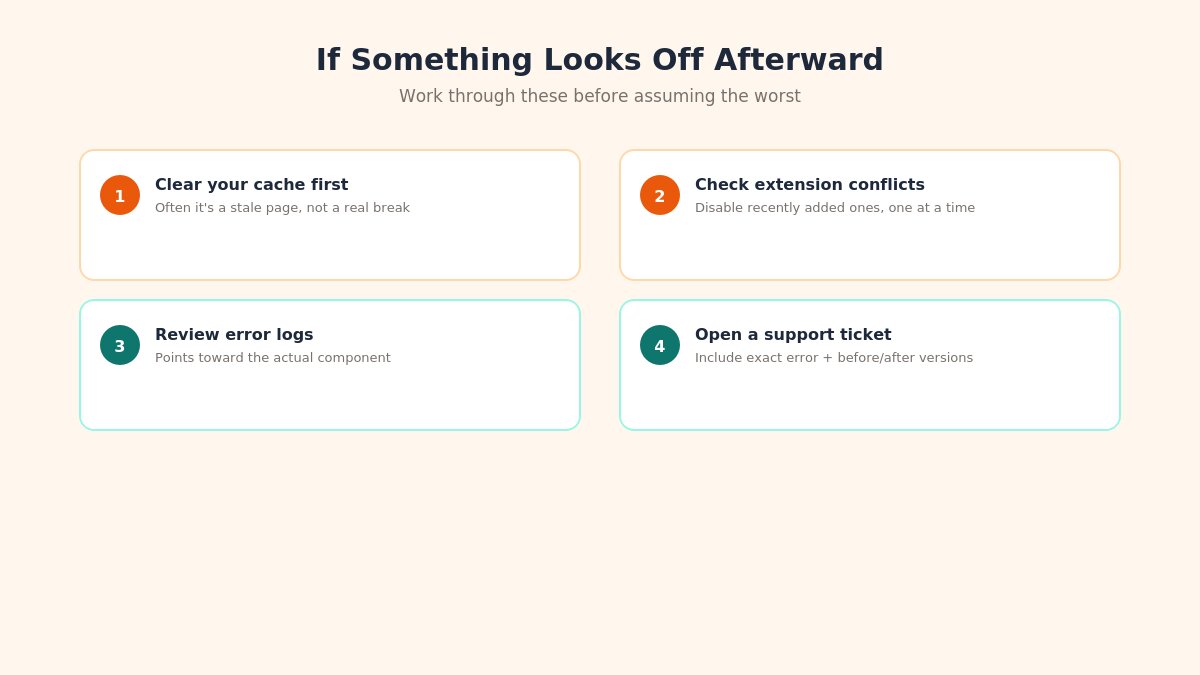
Joomla post-update troubleshooting checklist
Point releases are generally safe, but if something does look off after updating:
Clear your site’s cache first, including any server-level or CDN caching — a surprising number of “the update broke my site” reports turn out to be a cached pre-update page still being served.
Check for a specific extension conflict by temporarily disabling recently added or infrequently updated extensions one at a time, rather than assuming the core update itself is at fault.
Review your error logs for anything specific rather than guessing — Joomla’s error messages, while not always immediately clear, usually point toward the actual component or extension involved.
Check our documentation or FAQs for known compatibility notes if you’re running one of our templates, since template-specific quirks are worth ruling out before assuming a deeper problem.
Open a support ticket through our ticket support system if you’re stuck — a specific error message and your before/after version numbers make troubleshooting considerably faster than “it’s broken.”
The Broader Pattern: Why Frequent Small Patches Beat Rare Big Ones
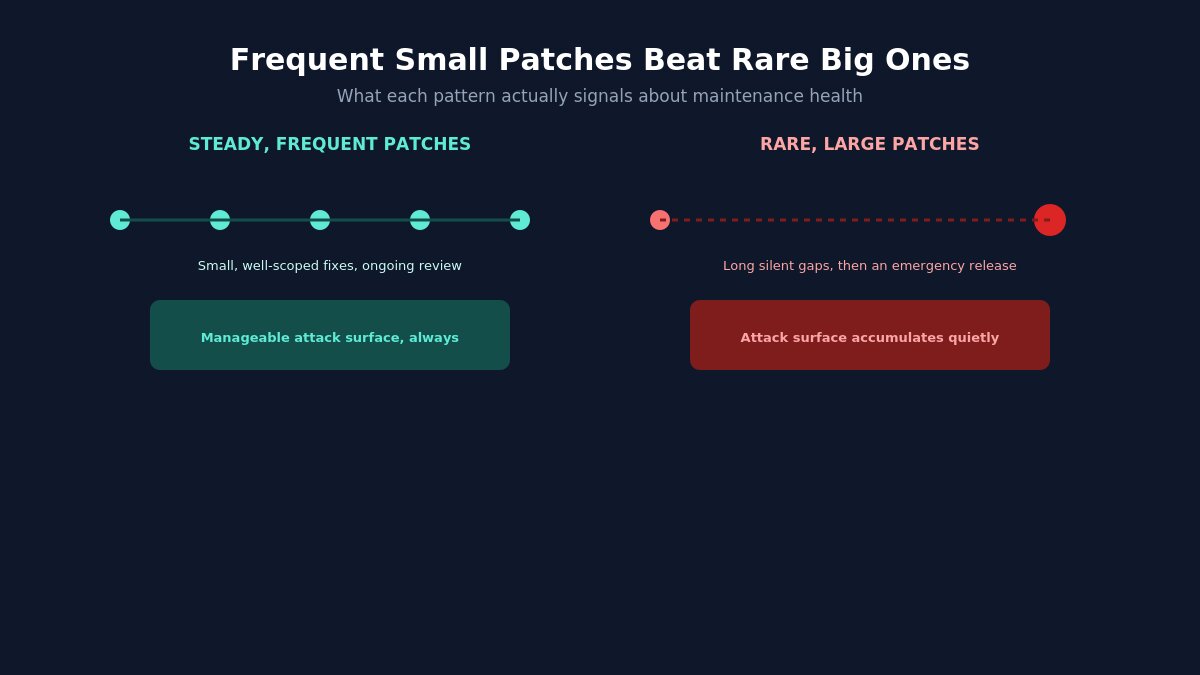
Comparison of frequent small security patches versus rare large ones
It’s worth stepping back from this specific release to make a point about Joomla’s update cadence generally, since it explains why staying current matters more than any single patch’s severity might suggest in isolation. A project that ships small, frequent security fixes — like this one — is doing exactly what you want a mature, actively maintained CMS to do: finding and closing gaps through ongoing review rather than waiting for a catastrophic issue to force an emergency release.
Compare this to the alternative failure mode, which is arguably worse even though it looks calmer from the outside: a project that ships security fixes rarely isn’t necessarily more secure — it may simply be reviewing its own code less rigorously, with vulnerabilities accumulating quietly until something forces a much larger, more disruptive release. A steady drumbeat of small point releases, each fixing one or two specific, well-scoped issues, is a healthier long-term signal than infrequent silence followed by an occasional emergency patch.
The risk isn’t really any individual point release like 6.1.3. The risk is the gap that opens up on a site that’s several versions behind, where multiple smaller fixes have accumulated into a meaningfully larger attack surface, and where the eventual jump to get current becomes a bigger, riskier undertaking than it needed to be. Staying roughly current — updating within a reasonable window of each release rather than batching updates once a year — is the actual practice that keeps this manageable, and it’s a far less stressful habit than the alternative of discovering you’re four major versions behind when something finally forces the issue.
What This Looks Like for a Site You Didn’t Build Yourself
A specific scenario worth addressing directly: if you inherited a Joomla site — bought a business with an existing website, took over site management from a previous employee or contractor, or are managing a client site you didn’t originally build — patch cycles like this one are exactly when unfamiliarity with the site’s actual state becomes a real liability. You may not know what extensions are installed, whether the template is actively maintained, or when the last update actually happened before you took over.
If that’s your situation, treat this patch as a prompt for a fuller initial audit rather than just applying the update in isolation: confirm the full extension list, check the template’s own update history separately from Joomla core, and get a clear picture of the site’s actual current state before assuming a single update brings everything current. This is a common enough situation that it’s worth building into your process the first time you take over an unfamiliar Joomla site, rather than treating every subsequent patch as an isolated event disconnected from the site’s broader maintenance history.
If You’re Choosing a New Joomla Template Right Now
If this patch cycle has you thinking about your broader Joomla setup — not just this one update, but whether your current template and extension stack is being actively maintained at all — it’s worth a quick audit. A template that hasn’t been updated in step with recent Joomla core releases is a slower-motion version of the same risk this patch addresses: not necessarily broken today, but drifting further from what current, supported Joomla actually expects underneath it. Our Joomla templates are maintained specifically to track current core releases rather than being built once and left alone, which is worth checking for whatever you’re currently running, regardless of where you got it.
Your Next Steps, In Order
Check your current Joomla version in the admin panel.
If you’re on 6.x below 6.1.3 or 5.x below 5.4.8, back up your site and update this week, not “eventually.”
If you’re on Joomla 4 or earlier, treat that as the more urgent underlying issue and plan the upgrade path.
If you run any API integrations, test them specifically after updating, since that’s the layer this release directly touches.
If anything looks off afterward, clear caches first, check extension conflicts second, and reach out to support if you’re still stuck.
None of this requires urgency bordering on panic — but it does deserve a spot on this week’s actual to-do list rather than a mental note that quietly never gets acted on.
We're a Digital Team from EngineTemplate with 5 content experts. Our team has 5 years exp in open source Joomla and WordPress, we make daily blogs and build useful resources for everyone who is having issues with open source while using it.
[…] as the default style, and test the site. The next time you apply an update, like the steps in our Joomla security release update guide, your customisations will still be there. Running WordPress as well? The same idea exists there; […]
 ET Digital Team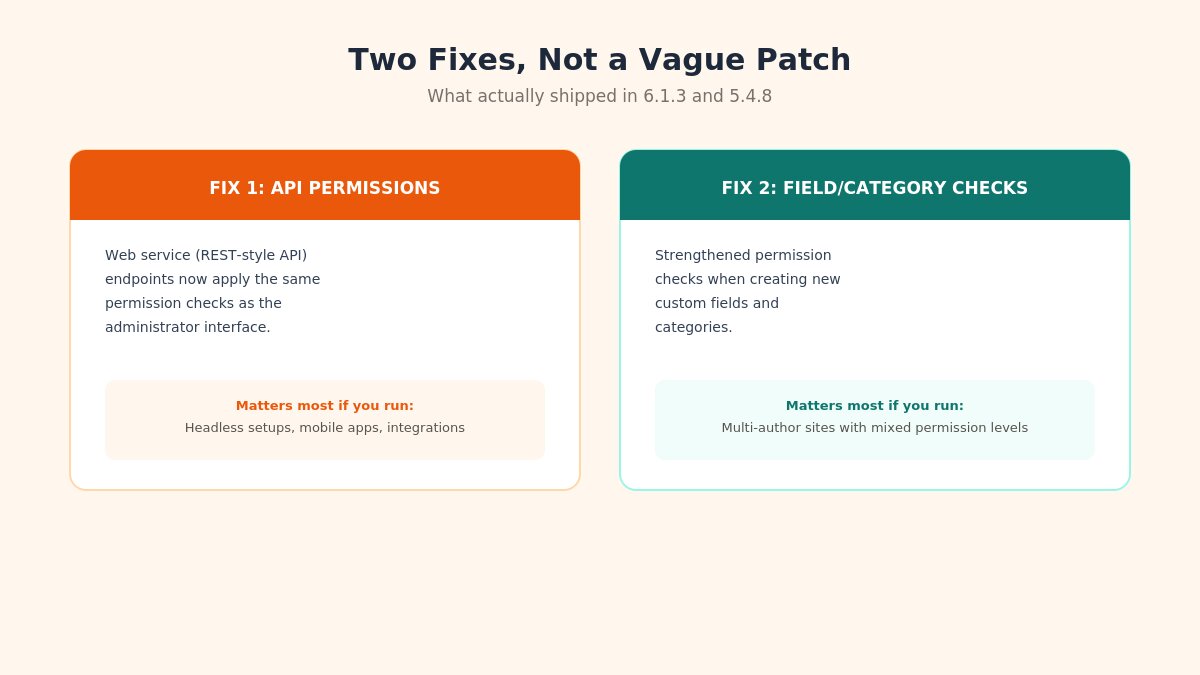








[…] as the default style, and test the site. The next time you apply an update, like the steps in our Joomla security release update guide, your customisations will still be there. Running WordPress as well? The same idea exists there; […]