Black Friday 50% off every Pro template with BLACKFRIDAY50, added on the payment page · ends in 3 days See the sale →

How To Solve Err Empty Response while Editing with Elementor Page Builder?

How To Solve Err Empty Response while Editing with Elementor Page Builder?

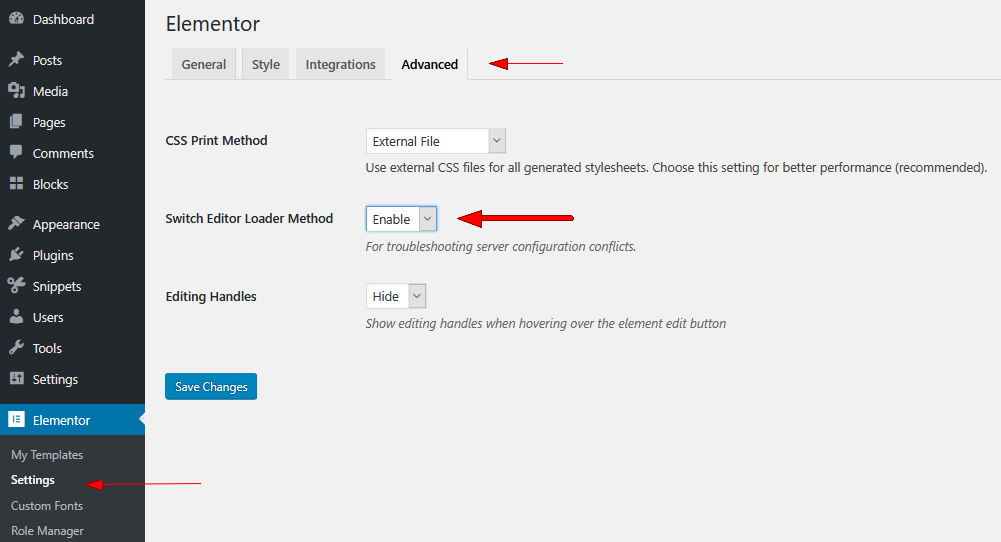
Some server can get a notice “Err Empty Response”. So you are able to fix this issue by following this.

Step 1: Go to WordPress dashboard > Elementor > Settings.

Step 2: Click on Advanced.

Step 3: Select Enable in the Switch Editor Loader Method, then Save changes.
How To Solve Err Empty Response while Editing with Elementor Page Builder?

Notes: Switch Editor Loader Method is helpful in fixing “err_content_decoding_failed” and  “err_empty_response”. Changing to this strategy will probably improve execution because the server doesn’t have any difficulty reading long JSON code.

CONCLUSION

That’s all we want to introduce to you. If you have any questions, remember to leave a comment below, we will answer as soon as possible.

Credit: Elementor Official
Build your next site faster.

Every Engine Templates design has a free version, and Pro comes with the complete demo site, ready to import.

Keep reading

Related articles.

Free download

We'll send the link, setup tips and update notices. Help is in the documentation and our contact form.

The download starts at once. We email you the link and ask you to confirm your address. Privacy policy.